 First Thing
Who it's for › Hybrid workers
Office days. Home days. One alarm.
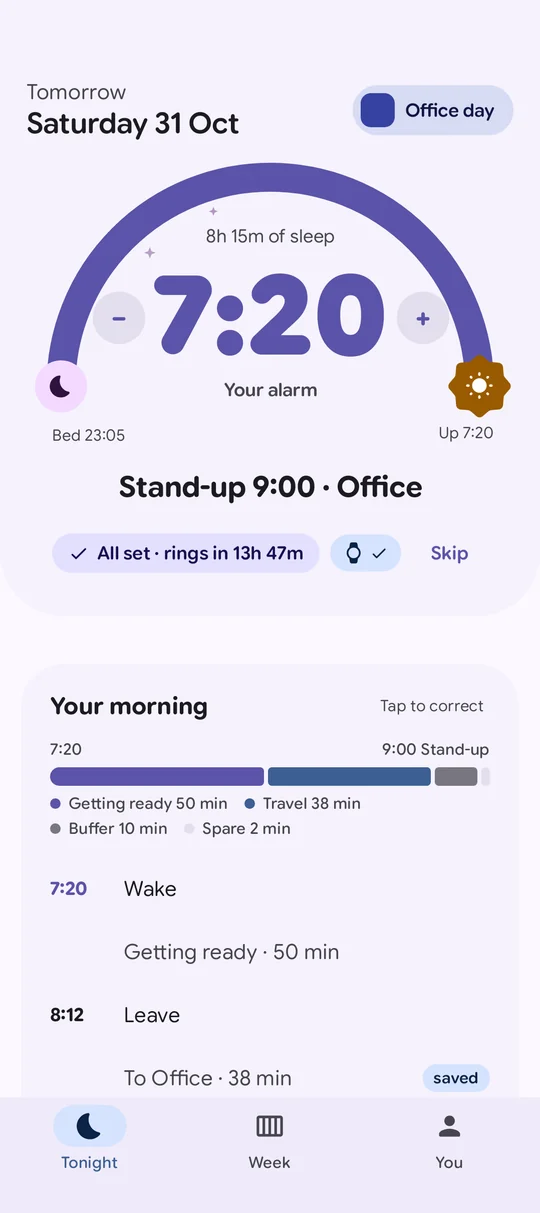
Office days need an hour more than home days, and the early meeting is never where you expect it. First Thing knows which day is which, reads tomorrow's calendar, and wakes you at the latest time that still works.
 Free. Pro free for 14 days, no card.
Sound familiar?
Office-day alarm on a home day.
An hour of sleep lost to the commute you aren't doing.
The 8:30 call you saw at 11pm.
Tomorrow changed after you set the alarm.
Traffic decides when you arrive.
The drive is 40 minutes, until it isn't.
Keep your calendar up to date. First Thing does the rest.
Accept the invite and carry on with your evening. First Thing sees the early start, works out the commute and gets you up in time.
Free asks you with one tap. With Pro, it moves the alarm by itself and tells you why.
How First Thing handles a hybrid week
Office days and home days
Tell it which days you go in and how you get there. Home days get the extra sleep.
FreeTraffic checked in the morning
With Pro, live traffic on the way to the office can move your alarm earlier, and it tells you why.
ProA leave-by nudge
On office days, a gentle reminder of when to head out. A suggestion, not a countdown on your alarm.
ProA hybrid week, planned.
Set it once. Early meetings and days off take care of themselves.
Questions
How does First Thing know office days from home days?
You tell it once in your week, along with how you get to the office. Each day shows as an Office day or a Home day.
Will it move my alarm for an early meeting?
Free asks you the evening before. Pro moves it by itself and tells you why.
What does live traffic send?
Only the start and end address of the trip, to Google's routing service. Your calendar stays on your phone.
Can I keep a fixed time on some days?
Yes. A time you set yourself is never moved.
Get the extra hour on home days.
Pre-register now and it installs itself on launch day. The alarm is free for good.