 First Thing
Who it's for › Students
Up for the first lecture. Not before.
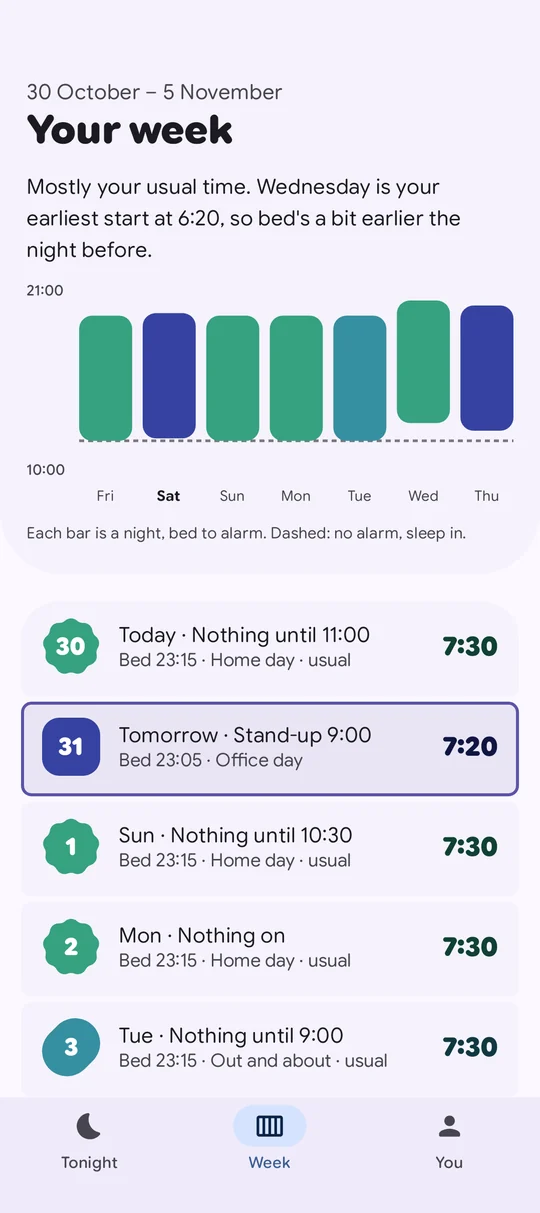
9:00 Monday, 14:00 Tuesday, nothing on Wednesday. Put your timetable in Google Calendar and First Thing wakes you for whatever's first each day, with time to get there. No more setting alarms at 2am.
 Free. Pro free for 14 days, no card.
Sound familiar?
Every day starts at a different time.
A timetable that changes daily means an alarm you change nightly.
Setting alarms at 2am.
Half-asleep maths about tomorrow's first lecture.
The one 9am you missed.
It's always the early one, the week it matters.
Keep your calendar up to date. First Thing does the rest.
Add your timetable to Google Calendar once, and keep it current when rooms and times move. First Thing wakes you for whatever comes first.
Free asks you with one tap. With Pro, it moves the alarm by itself and tells you why.
How First Thing handles a timetable
Time to get there
Tell it how you get to campus and how long you take to get ready. The alarm is the latest time that still works.
FreeNo lecture, no alarm
Nothing on tomorrow? It tells you, and you can still set one if you want.
FreeA bedtime that's realistic
It plans a bedtime from tomorrow's alarm, and won't lecture you about it.
FreeA timetable, planned.
Different every day, from your calendar.
Questions
Can First Thing read my university timetable?
If your timetable is in Google Calendar on your phone, yes. Many universities provide a calendar link you can add to Google Calendar.
Is it free for students?
The free version reads your calendar, suggests the right time and plans your bedtime. Most students won't need Pro.
What if I don't want to get up for a lecture?
Mark a calendar or a word as one that never wakes you, or skip tomorrow's alarm in one tap.
Does it work with my watch?
Yes, on Wear OS. The watch buzzes first, so you don't wake your flatmates.
Never set a 2am alarm again.
Pre-register now and it installs itself on launch day. The alarm is free for good.