 First Thing
 › Wear OS
Wake up to your watch, not the whole room.
First Thing rings on your Wear OS watch first. A buzz on your wrist at the right time, and your phone only joins in if you don't answer. Your partner sleeps on.
 The watch app is free.
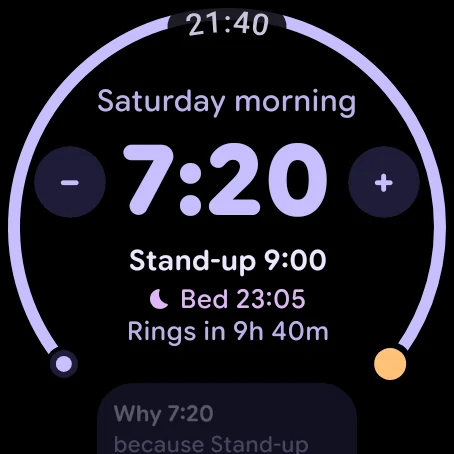
How a morning goes
1. Your wrist buzzes
At your alarm time, the watch vibrates and shows why: "Gym 7:45".
2. The phone waits
Two minutes later, the phone rings too, but only if you haven't stopped the watch. No watch on you? The phone rings on time.
3. Stop it on either
Tap I'm up on the watch or the phone and both go quiet. Snooze works the same way.
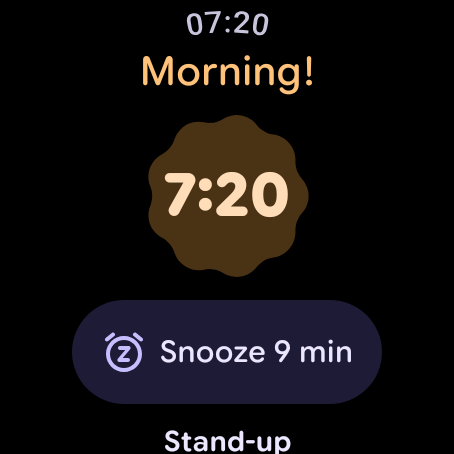
Everything about tomorrow, on your wrist.
- A tile with tomorrow's alarm, the reason and your bedtime, plus −15 and +15 to nudge it
- A complication on your watch face: your next alarm, or in the morning, when to leave
- Change tomorrow with the crown, skip it, or go back to the planned time
Smart wake, with Pro.
From 20 minutes before your alarm, if your watch can tell you're already stirring, it buzzes then, while it's easier to get up. It's never later than your alarm. It doesn't run while the watch is on its charger.
Questions
Which watches does First Thing work on?
Wear OS watches paired with an Android phone that has First Thing installed. It's tested on Pixel Watch; tell us how yours behaves.
Does the watch app work without my phone?
No. The watch app needs the phone app, which does the planning.
What if my watch is flat or off my wrist?
Then your phone rings on time, as normal.
Is the watch app free?
Yes. Ringing on the watch, the tile and the complication are free. Smart wake is part of Pro.